


Contact Info
106 Anne Rd, Knoxfield VIC 3180, Australia
+61 (03) 82023009
info@ninjaweb.com.au
Contact usRecommended Services


Supported Scripts
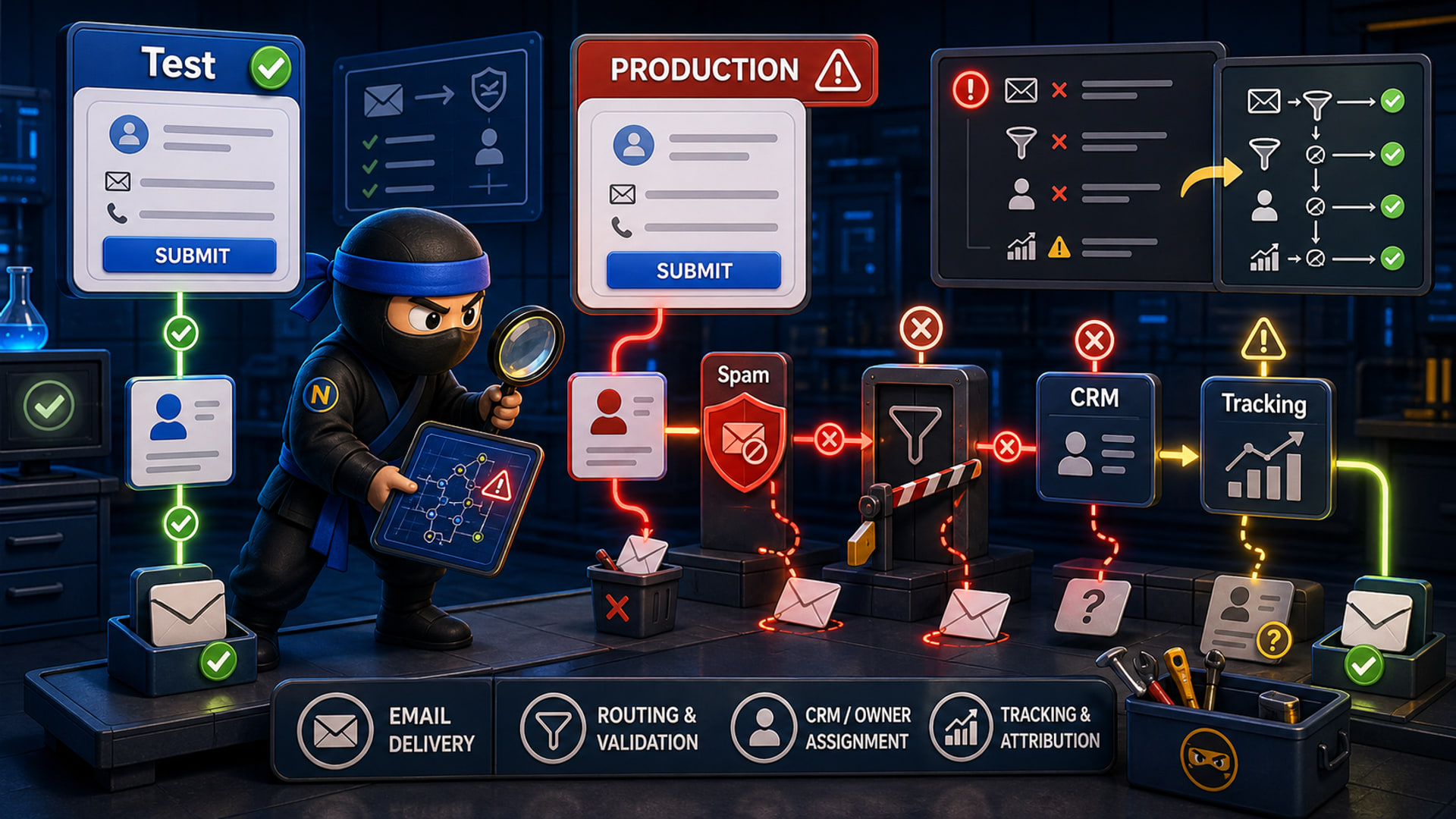

A contact form can work in testing and still fail in production because the test does not match the real operating conditions. The button submits, the success message appears, and everyone assumes the enquiry path is safe. Then real buyers start sending messages and the business discovers the form was only tested in the easiest situation.
The problem is rarely one magic setting. It is usually a chain of small assumptions across the website, hosting, email, spam protection, CRM, response owner, and the live business process around the enquiry.
A Test Submission Is Not The Same As A Live Enquiry
Many form tests are too shallow. Someone fills the form from the office, sees a thank-you message, checks one inbox, and marks the job done. That does not prove delivery, ownership, notification quality, CRM capture, spam placement, or after-hours handling.
A real enquiry has more variables. The visitor may be on mobile, overseas, using autofill, attaching files, choosing a service option, submitting outside business hours, or using an email provider that triggers stronger spam checks.
The form has to survive those normal conditions, not just the developer’s quick test.
A better test uses the same devices, pages, sender addresses, fields, and timing that customers will use. It also checks whether the submitted data is readable by the person who has to act on it, stored safely, and visible without logging into the wrong tool.
Delivery Can Break After The Website Says Success
The success message only proves the front end accepted the submission. It does not prove the message reached the right person. Email authentication, mail routing, server reputation, plugin configuration, firewall rules, mailbox filtering, and CRM integrations can still fail behind the screen.
- The website sends from an unauthorised domain.
- The inbox filters the message as spam.
- The CRM receives a record without useful context.
- The notification goes to a staff member who has left.
- The form works until a security update changes behaviour.
That is why production testing has to follow the enquiry all the way through.
The follow-through matters most when money is attached. A missed quote request, health enquiry, booking question, service call, or supplier lead can look like a marketing problem when the real fault is the delivery chain after the submit button.
Spam Protection Can Block The Wrong Thing
Spam protection is necessary, but it can also create quiet failure. Captcha, honeypots, rate limits, firewalls, content filters, and security plugins can block real users if they are added without testing the full journey.
A contact form is not working until a real enquiry reaches a real owner with useful context.
This is especially important after plugin updates, hosting changes, DNS changes, CDN rules, or form builder migrations. The form may still look identical while the back-end path has changed.
Any security change should be followed by a fresh form test. The business should not wait for a customer to report that the form is rejecting them, hiding validation errors, losing attachments, or silently dropping urgent work during a busy sales day.
Ownership Is Part Of The Form
A contact form is not only a technical component. It is a business handoff. Someone should own the inbox, someone should be the backup, and the business should know what happens when the usual person is away.
The test should include response behaviour. Does the owner know a lead arrived? Is the subject line useful? Does the message show the page, service, source, and urgency? Can the team see whether the enquiry was answered? Does the CRM or inbox make follow-up visible?
If those answers are unclear, the form is creating work but not control.
The owner rule should be written down because staff, inboxes, and tools change. A form that worked last month can fail this month if the person who received the alert is no longer watching that mailbox.
Test The Whole Path, Not The Button
NinjaWeb can help businesses test and repair the full enquiry path behind contact forms. That can include business website planning, web design, web hosting, form routing, mail authentication, CRM-ready fields, and monitoring.
The useful test is simple. Submit a real enquiry from outside the admin environment, then follow it until a person can respond properly. Check the inbox, CRM, notification, spam folder, confirmation message, backup owner, attachment handling, and whether the response expectation is actually visible.
If the business cannot prove that path, the contact form has not really passed. It has only looked successful on the screen.
Share this Post

The Serious Operator Does Not Ask for Magic
shadow-scribe