



Incremental Snapshots
Capture changed files without rebuilding the whole backup every time.

106 Anne Rd, Knoxfield VIC 3180, Australia
+61 (03) 82023009
info@ninjaweb.com.au
Contact us
Encrypted snapshot and recovery console
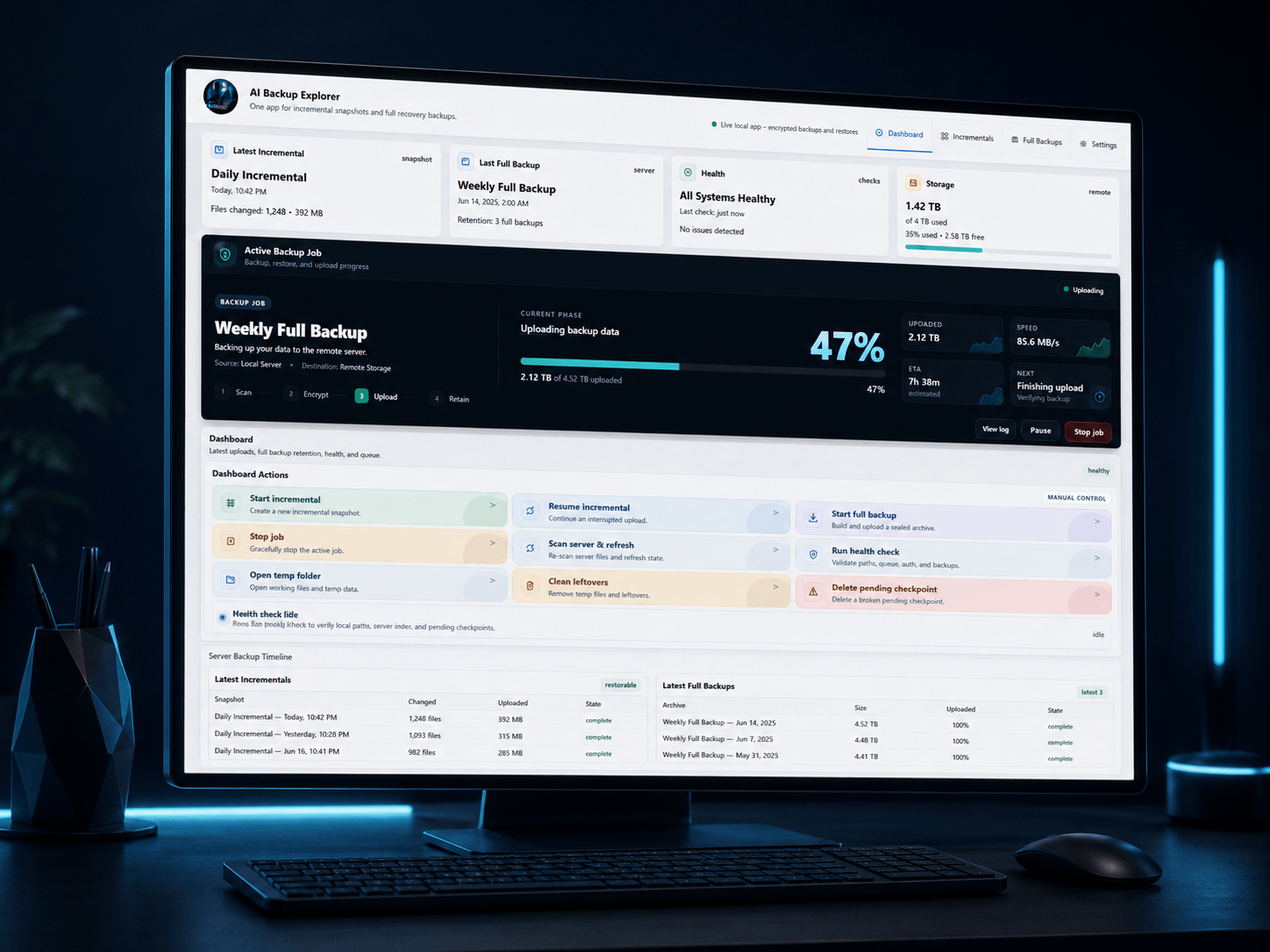
A clean backup command centre for local AI workspaces, Codex files, SSH keys, rules, repositories, and recovery archives. Browse snapshots, run full encrypted backups, restore files, and see every job clearly.
ai-full-2026-06-18_21-00-00.zip.enc
Uploading to /root/AI-Backups/full. Resume is available automatically if the connection drops.
Not just a zip script. AI Backup Explorer gives you visibility, control, restore confidence, and a proper interface for managing critical AI workspace files.
Capture changed files without rebuilding the whole backup every time.
Create sealed recovery archives with clear progress, resume, verify, and rotation steps.
Browse snapshot contents and restore the exact file or folder you need.
Keep sensitive files like auth configs, SSH keys, and rules clearly marked.
See queue state, backup health, retention, latest uploads, and next actions.
Designed for local workstations, private repositories, AI agent folders, and secure recovery.
AI development creates scattered files fast - rules, repos, sessions, configs, secrets, scripts, and experiments. Losing one folder can waste hours or days.
AI Backup Explorer keeps the system visible. You know what is backed up, what is running, what failed, and what can be restored.
AI Backup Explorer is a portable Windows control panel for encrypted local backups. It starts a local backend, opens in your browser, and gives you a clean way to configure backup sources, SFTP storage, encryption, retention and restores.
The point is simple: protect local AI, dev and business work without editing scripts or trusting a mystery cloud.
AI Backup Explorer v0.1.0 is shipped as a portable Windows ZIP, not a full installer. The normal workflow is simple: extract the ZIP, run the launcher, let the local backend start, and use the browser interface that opens from the app.
The packaged release includes the runtime pieces needed for the normal user flow. Users should not need to install Node.js, npm or WinSCP separately when using the Windows x64 ZIP package.
A normal setup would extract the ZIP to a clean folder, run NinjaWeb-AI-Backup-Explorer.cmd, leave the launcher window open while using the app, and press Q in that launcher when it is time to stop the local backend cleanly.
The app expects you to configure a server target. That can be a VPS, dedicated server, storage server or other SFTP-capable environment you control. The point is not to sell another mystery cloud. The point is to put encrypted backup content onto storage you choose.
In Settings, you configure the server host, port, username, remote root path, authentication mode, and either a server password or SSH key path. The product model separates incremental and full backup objects under the configured remote root.
The server should receive encrypted backup content only. If someone can browse the remote storage, the remote side should not expose your plaintext local files.
The security model is deliberately simple enough to understand. Server authentication is stored locally with Windows current-user protection. The backup encryption password is not stored by default. The user unlocks encryption when backup or restore work needs it.
Uploads to the server are encrypted backup content, not plaintext files. Private keys are referenced from the user’s machine; they are not copied into the product package. Logs and errors should not expose passwords, tokens, private key material or encryption secrets.
Restore behaviour matters more than backup theatre. AI Backup Explorer is designed to restore selected files or folders into a configured restore target. Restores should not overwrite original files by default. The safer path is to restore the item, inspect it, then decide what should replace production work.
For people building serious local systems who do not want their backup process hidden inside a script window.
Protect rules, projects, memory files, configs, and local experiments.
Backup repositories, scripts, local tooling, and server connection files.
Keep client automation and internal build folders recoverable.
Run backups with visibility instead of hoping a background script worked.
Use AI Backup Explorer to control snapshots, full backups, restore flow, and health checks from one clean interface.
Download Free Early AccessStable Windows x64 build - free during early access. Version 0.1.0.